Tracking 101: cookies, pixels, device IDs — and where a VPN fits


TL;DR
- Online tracking happens at three distinct levels: network, browser, and account
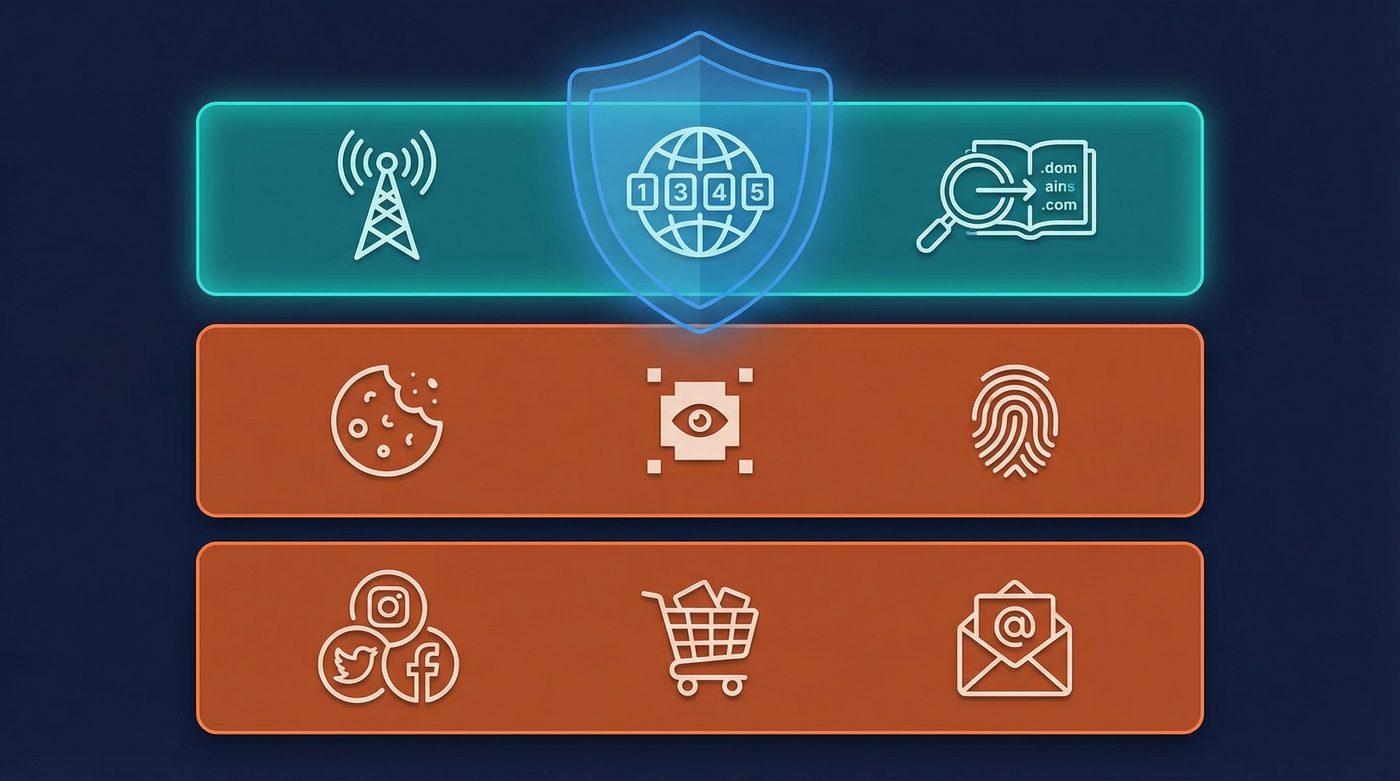
- A VPN protects you at the network level by hiding your IP address and encrypting DNS queries
- VPNs cannot stop browser-level tracking like cookies, tracking pixels, or browser fingerprinting
- Account-level tracking occurs when you log into services, linking your activity directly to your identity
- True privacy requires layering tools: a VPN, tracker blockers, and privacy-focused browser settings
What a VPN Does (and Doesn't)
✅ A VPN does: - Encrypts your connection between your device and the VPN server - Hides your IP address from websites and trackers - Secures your DNS queries from your internet service provider - Helps reduce exposure on public Wi-Fi networks
❌ A VPN doesn't: - Block first-party or third-party cookies - Stop tracking pixels from loading on web pages - Prevent browser fingerprinting or device ID tracking - Hide your identity when you log into an account
You connect to a VPN, verify your IP address has changed, and assume your browsing is now private. But then you search for a pair of shoes, and ads for those exact shoes follow you across the internet for the next week.
If the VPN is working, how do they know it's you?
The reality is that your IP address is just one piece of the tracking puzzle. The modern internet relies on a complex web of tracking technologies designed to identify you, monitor your behavior, and build detailed profiles—regardless of where your connection originates.
This guide breaks down the three levels of online tracking, explains how tools like cookies and pixels actually work, and clarifies exactly where a VPN fits into your privacy setup.
The Three Levels of Tracking
To understand how you are tracked online, it helps to divide the ecosystem into three distinct levels. Each level uses different technologies, and protecting yourself requires different tools.
1. Network-Level Tracking
This is the foundational layer of how your device connects to the internet. It involves your IP address, your internet service provider (ISP), and the physical or virtual networks you use.
2. Browser-Level Tracking
This happens within the software you use to access the web. It involves the data websites store on your device and the unique characteristics of your browser.
3. Account-Level Tracking
This is the most direct form of tracking. It occurs when you voluntarily identify yourself by logging into a service, linking your actions directly to your real-world identity.
Network-Level Tracking: Where a VPN Shines
When you connect to the internet without a VPN, your connection exposes two critical pieces of information: your IP address and your DNS queries.
IP Address Tracking
Your IP address is a unique string of numbers assigned to your network. Every time you visit a website, your device must reveal its IP address so the server knows where to send the requested data.
Websites and ad networks use your IP address to determine your approximate physical location (down to the city or neighborhood level) and to link your visits over time. If you visit a site on Monday and again on Thursday from the same IP address, the site assumes you are the same user.
Where a VPN fits: A VPN replaces your real IP address with the IP address of the VPN server. Websites see the server's location, not yours. This breaks the link between your physical location and your browsing activity.
Learn more: What is a VPN? How it works and what it does (in plain English)
DNS Queries
The Domain Name System (DNS) translates human-readable web addresses (like example.com) into IP addresses. By default, your ISP handles these requests. This means your ISP can see every website you visit, even if the connection to the site itself is encrypted.
Where a VPN fits: A high-quality VPN routes your DNS queries through its own encrypted tunnel. Your ISP only sees that you are connected to a VPN server, not which websites you are asking to visit.
Learn more: Private DNS: why DNS leaks happen and how Private DNS helps
Browser-Level Tracking: What a VPN Can't Stop
This is where the majority of commercial tracking happens. Because a VPN only encrypts the connection to the website, it cannot control what the website does once you arrive.
Cookies: First-Party vs. Third-Party
Cookies are small text files that websites store in your browser. They were originally designed for essential functions, like keeping you logged in or remembering what is in your shopping cart.
- First-party cookies are set by the site you are visiting. They are generally useful and necessary for the site to function.
- Third-party cookies are set by domains other than the one you are visiting—usually ad networks or analytics companies.
The scenario: You visit a news website. The site loads a third-party cookie from an ad network. Later, you visit a cooking blog that uses the same ad network. The network reads the cookie it set earlier, recognizes you as the same user, and serves an ad based on the news article you read. A VPN does not stop this process.
Tracking Pixels
A tracking pixel is a tiny, transparent image (often 1x1 pixel) embedded in a webpage or email. When your browser loads the page, it must request the image from the tracker's server.
This request sends a wealth of information back to the tracker, including the time you opened the page, your device type, and your IP address. The Facebook Pixel is a prime example. Millions of websites embed this pixel to track conversions and build audiences. Even if you don't have a Facebook account, the pixel records your visit and sends the data to Meta.
Device IDs and Supercookies
When standard cookies are blocked or deleted, trackers use more persistent methods to identify your device.
- LocalStorage: A web storage feature that allows sites to store much more data than standard cookies, and it doesn't expire automatically.
- HSTS Supercookies: A security feature (HTTP Strict Transport Security) that forces browsers to use secure connections. Trackers can manipulate this feature to assign a unique identifier to your browser that persists even in incognito mode.
- ETags: A caching mechanism designed to speed up page loads. Trackers can use ETags to recognize returning visitors by checking if the browser has a specific version of a file cached.
Browser Fingerprinting
Instead of storing a file on your device, browser fingerprinting identifies you based on the unique configuration of your software and hardware.
When you visit a site, scripts collect data about your operating system, browser version, installed fonts, screen resolution, timezone, and even the specific way your graphics card renders images (Canvas fingerprinting). Combined, these data points create a highly unique "fingerprint." Even if you use a VPN and clear your cookies, your fingerprint remains the same.
Learn more: Browser fingerprinting: what it is and how to reduce it
Account-Level Tracking: The Ultimate Identifier
The most reliable way for a company to track you is for you to tell them exactly who you are.
When you log into a service—whether it's a social media platform, an email provider, a shopping site, or a streaming service—you link your current session to your account profile.
If you log into Google and search for a product, Google records that search. If you then watch a YouTube video, Google links that view to the same profile. If you use a VPN to change your IP address to another country, Google still knows it's you because you are logged in. The VPN hides your location, but your account login overrides any anonymity the VPN might have provided.
This extends to "Log in with Google" or "Log in with Facebook" buttons on third-party sites. Using these convenient options allows the tech giants to track your activity across the web, tying your behavior on independent sites directly to your central profile.
Learn more: Do VPNs make you anonymous? What a VPN can and can't hide
Where a VPN Fits in the Tracking Landscape
A VPN is a powerful tool, but it is a specific tool for a specific job. It is the foundation of network privacy, not a magic bullet for all online tracking.
What a VPN protects: - Hides your real IP address from websites and trackers - Prevents your ISP from logging your DNS queries and browsing history - Secures your data from local network snooping (like on public Wi-Fi) - Masks your physical location
What a VPN does not protect: - It does not block cookies or tracking pixels - It does not alter your browser fingerprint - It does not hide your identity if you log into an account - It does not stop data brokers from compiling information you voluntarily share
Learn more: Metadata vs content: why who, when, and where can matter as much as what
How to Layer Privacy Tools
Because tracking happens at multiple levels, privacy requires a layered approach. A VPN is the first layer, but it must be combined with other tools and habits.
The Baseline Setup
For everyday browsing, combine these tools to address both network and browser-level tracking:
- A trusted VPN: To hide your IP address and encrypt your DNS queries.
- Tracker blocking extension: Tools like uBlock Origin block third-party cookies, tracking scripts, and known tracking pixels before they load.
- Cookie management: Configure your browser to block third-party cookies by default and clear first-party cookies when you close the browser.
- Private DNS: Ensure your VPN provider handles DNS requests securely, preventing leaks to your ISP.
Enhanced Privacy
If you need stronger protection against advanced tracking methods:
- Privacy-focused browser: Browsers like Brave or Firefox (with strict privacy settings enabled) offer built-in protections against fingerprinting and supercookies.
- Minimize fingerprinting: Avoid installing unnecessary browser extensions, as each extension makes your browser more unique.
- Avoid logging in: Browse without logging into accounts whenever possible. Use separate browsers for logged-in sessions (like work or banking) and general web browsing.
Behavioral Discipline
The most effective privacy tool is your own behavior. Be mindful of what you share, avoid using single sign-on options (like "Log in with Facebook"), and understand that convenience often comes at the cost of privacy.
Learn more: VPN vs proxy vs Tor: what to use for which situation
The PrivateByRight Approach
We build our VPN to handle the network layer of your privacy stack, and we are honest about where our protection ends.
What We Protect
- No-logs: We do not log your browsing history, DNS queries, or connection timestamps. Our systems are designed to minimize data collection by default.
- Private DNS: All DNS requests are routed through our encrypted tunnel, keeping them away from your ISP.
- IP Masking: We replace your IP address with one of our server IPs, breaking the link between your physical location and your network activity.
What We Don't Claim
We will never tell you that our VPN makes you "100% anonymous" or stops all online tracking. We cannot block the cookies a website sets in your browser, and we cannot hide your identity if you log into Facebook.
Privacy requires a stack of tools. We provide the network layer; you control the browser and account layers.
Learn more: - No-logs explained: what it means, what to look for, and how we design for it - Our privacy principles: data minimisation, default protection, and clarity
FAQs
Does clearing my cookies stop tracking?
Clearing your cookies removes stored identifiers, which forces trackers to assign you a new ID the next time you visit. However, it does not stop tracking pixels, browser fingerprinting, or IP address tracking. It is a good habit, but not a complete solution.
Can a VPN block tracking pixels?
No. A VPN encrypts the connection, but it still delivers the webpage (including the tracking pixel) to your browser. To block pixels, you need a tracker-blocking browser extension like uBlock Origin.
If I use Incognito mode and a VPN, am I anonymous?
No. Incognito mode simply deletes cookies and browsing history from your device after you close the window. It does not hide your IP address (which the VPN handles), and it does not prevent browser fingerprinting or account-level tracking while the window is open.
Why do I still see targeted ads while using a VPN?
If you are seeing targeted ads while using a VPN, it is likely due to browser-level tracking (cookies or fingerprinting) or account-level tracking (you are logged into a service like Google). The ad network recognizes your device or account, regardless of your IP address.
What is the difference between a cookie and a device ID?
A cookie is a small text file stored by your browser that can be easily deleted. A device ID (or supercookie) uses more persistent storage methods or hardware characteristics to identify your device, making it much harder to remove or block.
Sources & Further Reading
- Mozilla Developer Network. "HTTP Cookies." MDN Web Docs, 2025.
- Electronic Frontier Foundation. "Cover Your Tracks: How Trackers Learn Who You Are." EFF, 2024.
- Laperdrix, P., et al. "Browser Fingerprinting: A Survey." ACM Transactions on the Web, 2020.
- Federal Trade Commission. "How To Protect Your Privacy Online." FTC Consumer Information, 2023.
- Englehardt, S., & Narayanan, A. "Online Tracking: A 1-million-site Measurement and Analysis." Princeton University, 2016.
Related Guides
- Learn more: What is a VPN? How it works and what it does (in plain English)
- Learn more: Do VPNs make you anonymous? What a VPN can and can't hide
- Learn more: Browser fingerprinting: what it is and how to reduce it
- Learn more: Metadata vs content: why who, when, and where can matter as much as what
- Learn more: Private DNS: why DNS leaks happen and how Private DNS helps
- Learn more: No-logs explained: what it means, what to look for, and how we design for it
- Learn more: VPN vs proxy vs Tor: what to use for which situation
- Learn more: Our privacy principles: data minimisation, default protection, and clarity