Split tunneling: when to use it, risks, and best practices


TL;DR
- Split tunneling lets you route some traffic through the VPN while the rest uses your normal internet connection
- It improves performance for gaming and streaming, and allows access to local network devices like printers
- The main risks include accidental IP exposure, DNS leaks, and inconsistent protection across apps
- Best practice is to use an allow list (only excluding specific low-risk apps) rather than a deny list
- Never exclude your browser, messaging apps, or torrent clients from the VPN tunnel
What a VPN Does (and Doesn't)
✅ A VPN does: - Encrypts your connection between your device and the VPN server - Hides your IP from many websites and services - Helps reduce exposure on public networks
❌ A VPN doesn't: - Make you anonymous - Stop all tracking (cookies and fingerprinting still exist) - Protect traffic that you explicitly route outside the VPN tunnel
When you connect to a VPN, the default behavior is to route all your internet traffic through the encrypted tunnel. This is the safest approach, but it's not always the most practical. Sometimes, you need your device to be in two places at once.
You might want to protect your web browsing while letting a fast-paced multiplayer game use your direct connection to minimize lag. Or you might need to access a local network printer while keeping your work communications encrypted. This is where split tunneling comes in.
This guide explains how split tunneling works, the different ways to configure it, the security trade-offs you're making, and how to set it up without compromising your core privacy.
How Split Tunneling Works
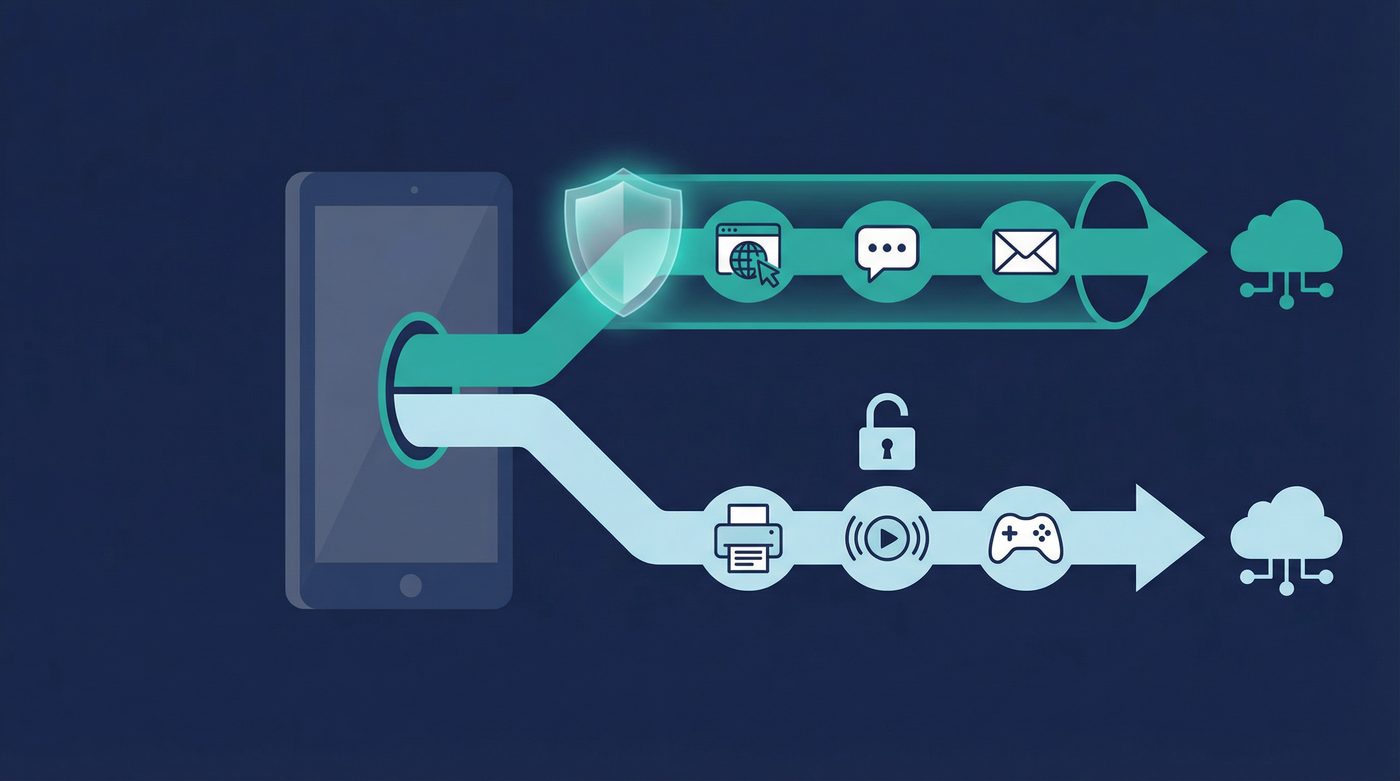
At its core, split tunneling creates a fork in the road for your internet traffic. Instead of forcing every single data packet through the encrypted VPN tunnel, the VPN software acts as a traffic controller on your device.
When an app requests internet access, the VPN checks its rules. If the app is designated to use the VPN, its traffic is encrypted and sent to the VPN server. If the app is excluded, its traffic bypasses the encryption and goes directly to your internet service provider (ISP), just as it would if the VPN were turned off.
This means your device maintains two simultaneous connections: one secure, encrypted path for sensitive data, and one direct, unencrypted path for everything else.
App-Based vs. URL-Based Split Tunneling
There are two primary ways VPNs handle this traffic routing, and they serve different purposes.
App-based split tunneling is the most common and reliable method. You select specific applications installed on your device—like a game, a streaming app, or a backup tool—and tell the VPN to either include or exclude them. This happens at the operating system level, making it robust and difficult to bypass accidentally. It's best for users who want to exclude entire programs from the VPN.
URL or domain-based split tunneling operates differently. Instead of excluding an entire app (like your web browser), you specify certain websites or domains (like netflix.com or your bank's URL) to bypass the VPN. This is useful when a specific website blocks VPN traffic, but you still want the rest of your browsing protected. However, it's technically more complex and prone to errors, as modern websites often pull resources from dozens of different domains, which can cause the page to break if not all of them are excluded.
4 Use Cases Where Split Tunneling is Useful
Routing all traffic through a VPN is the most secure baseline, but there are specific scenarios where split tunneling solves real problems.
1. Accessing Local Network Devices
When a VPN encrypts all your traffic, it often isolates your device from your local network (LAN) for security reasons. This means you can't see or communicate with other devices in your home or office.
If you need to print a document on a wireless printer, access files on a Network Attached Storage (NAS) drive, or cast a video to a smart TV, a full VPN connection will block you. Split tunneling allows you to exclude local network traffic from the VPN, letting you communicate with your printer while your web browsing remains encrypted.
2. Streaming and Gaming Performance
VPNs introduce overhead. The encryption process takes processing power, and routing your traffic to a remote server adds physical distance, which increases latency (ping).
For competitive gaming, every millisecond matters. A VPN can introduce lag that ruins the experience. Similarly, streaming 4K video requires significant bandwidth, and a VPN might slow your connection just enough to cause buffering. By excluding your game client or streaming app via split tunneling, you get the maximum speed and lowest latency your ISP provides, while keeping your background tasks and browsing secure.
Learn more: - VPN for streaming: what's realistic, what's not, and how to improve quality - VPN for gaming: reducing lag, avoiding DDoS, and choosing server locations
3. Work Tools That Block VPNs
Many corporate networks and enterprise tools employ strict security measures that block known VPN IP addresses. If you're working remotely, you might find that you can't log into your company's intranet or use specific internal tools while your personal VPN is active.
Instead of turning off your VPN entirely—which exposes all your personal browsing—you can use split tunneling to exclude the specific work applications or domains, allowing them to connect directly while the rest of your traffic stays in the tunnel.
4. Bandwidth Management
If you have a limited data cap on your VPN plan, or if you're performing massive file transfers that don't require privacy (like downloading a 100GB game update from a trusted platform like Steam), routing that data through the VPN is a waste of resources.
Split tunneling lets you route these heavy, low-risk downloads through your standard connection, preserving your VPN bandwidth and potentially speeding up the download.
4 Security Risks of Split Tunneling
Flexibility always comes with trade-offs. When you enable split tunneling, you are intentionally poking holes in your security perimeter. You need to understand what can leak through those holes.
1. IP Address Exposure
The most obvious risk is that any app or website routed outside the VPN tunnel will see your real IP address. Your ISP will also see the traffic generated by those excluded apps. If you accidentally exclude an app that handles sensitive data, you lose the primary benefit of the VPN for that specific traffic.
2. Inconsistent Protection
When some apps are protected and others aren't, it's easy to lose track of your security posture. You might assume you're protected because the VPN icon is active in your system tray, forgetting that you excluded your email client three months ago. This false sense of security can lead to careless behavior.
3. DNS Leaks
The Domain Name System (DNS) translates human-readable web addresses into IP addresses. A secure VPN routes your DNS requests through its own encrypted servers.
When you use split tunneling, there's a risk that the DNS requests for the excluded apps might leak and be handled by your ISP's DNS servers instead. Worse, poorly implemented split tunneling might cause all your DNS requests to leak, exposing your browsing history to your ISP even for the apps that are supposed to be inside the tunnel.
Learn more: - Private DNS: why DNS leaks happen and how Private DNS helps - VPN leaks explained: DNS, IPv6, and WebRTC, and how to check yours
4. Malware and Compromised Apps
If an app is excluded from the VPN, its traffic is unencrypted (unless it uses HTTPS/TLS on its own). If that app is compromised, or if you download malware through an excluded browser, the malicious traffic has a direct line to the internet, bypassing any network-level protections the VPN might offer.
5 Best Practices for Safe Split Tunneling
If you decide the benefits outweigh the risks, follow these rules to configure split tunneling safely.
1. Use an Allow List, Not a Deny List
Most VPNs offer two ways to configure split tunneling: - Route all traffic through the VPN, except for these specific apps (Deny List / Exclude). - Route NO traffic through the VPN, except for these specific apps (Allow List / Include).
The safest approach is usually the first one: keep the VPN as the default for everything, and only explicitly exclude the few apps that absolutely need a direct connection (like a game or a local backup tool). This ensures that any new app you install is protected by default.
2. Never Exclude Sensitive Apps
There are certain applications that should always remain inside the encrypted tunnel. Never use split tunneling to exclude: - Web browsers (Chrome, Firefox, Safari, etc.) - Messaging applications (Signal, WhatsApp, Telegram) - Torrent clients or P2P software - Cryptocurrency wallets
Learn more: P2P, torrenting, and VPNs: privacy basics, safety, and what to avoid
3. Enable DNS Leak Protection
Ensure your VPN's DNS leak protection feature is enabled, even when using split tunneling. This forces the DNS requests for your protected apps to stay within the tunnel, preventing your ISP from seeing which websites you're trying to visit.
4. Test for Leaks After Configuring
Don't just trust that the configuration worked. After setting up split tunneling, test it. 1. Check your IP address in a protected browser (it should show the VPN's IP). 2. Check your IP address in an excluded browser or app (it should show your real IP). 3. Run a DNS leak test to ensure your protected traffic isn't leaking queries to your ISP.
Learn more: How to check if your VPN is working: IP & DNS leaks, a quick guide
5. Disable on Public Wi-Fi
Split tunneling is generally safe on a trusted home network. However, if you are connected to an untrusted public Wi-Fi network (like at a coffee shop or airport), you should disable split tunneling entirely.
On public Wi-Fi, any unencrypted traffic is vulnerable to interception by anyone else on the network. You want 100% of your traffic inside the encrypted tunnel when you don't control the router.
Learn more: VPN on public Wi-Fi: the real risks and a simple protection checklist
The PrivateByRight Approach
We design our split tunneling feature to be clear, reliable, and secure by default.
App-Based Configuration
We use app-based split tunneling because it is the most robust method at the operating system level. You can easily select which applications bypass the VPN directly from the settings menu.
Secure Defaults
By default, all traffic is routed through the VPN tunnel. You must explicitly choose to exclude an app. We recommend this "exclude-only" approach for most users, as it ensures new applications are protected automatically.
Integrated Kill Switch and Private DNS
Our split tunneling works in tandem with our system-level kill switch. If the VPN connection drops, traffic for your protected apps is blocked, while your excluded apps continue to function normally. Furthermore, our Private DNS ensures that DNS requests for your protected apps never leak outside the tunnel.
FAQs
Does split tunneling speed up my internet?
It can speed up the specific apps you exclude from the VPN. By routing a game or streaming app directly through your ISP, you remove the encryption overhead and the physical distance to the VPN server, which lowers latency and maximizes bandwidth for that specific app.
Is split tunneling safe for banking?
You should generally keep your banking apps and browsers inside the VPN tunnel. While banks use their own HTTPS encryption, routing them through the VPN adds an extra layer of security and hides the fact that you are communicating with a bank from your ISP or local network administrator.
Why isn't split tunneling available on iOS?
Apple's iOS operating system has strict sandboxing rules that prevent VPN applications from managing traffic on a per-app basis. Because of these OS-level restrictions, true app-based split tunneling is currently not possible on iPhones and iPads.
Can I use split tunneling to access local devices?
Yes. This is one of the most common use cases. By excluding local network traffic or specific local apps, you can print to a wireless printer or access a local NAS drive while the rest of your internet traffic remains encrypted by the VPN.
Does split tunneling cause DNS leaks?
It can, if poorly implemented. When you split traffic, the device has to decide which DNS server to use for which app. If the VPN software doesn't handle this correctly, the DNS requests for your protected apps might leak to your ISP. Always use a VPN with built-in DNS leak protection and test your setup.
Sources & Further Reading
- National Institute of Standards and Technology (NIST). (2021). Guide to Enterprise Telework, Remote Access, and Bring Your Own Device (BYOD) Security.
- Cybersecurity and Infrastructure Security Agency (CISA). (2020). Enterprise VPN Security.
- Internet Engineering Task Force (IETF). (2015). DNS Privacy Considerations (RFC 7626).
- SANS Institute. (2019). Virtual Private Networks: Security and Configuration Guidelines.
- Electronic Frontier Foundation (EFF). (2023). Choosing the VPN That's Right for You.
Related Guides
- Learn more: What is a VPN? How it works and what it does (in plain English)
- Learn more: Do VPNs make you anonymous? What a VPN can and can't hide
- Learn more: Kill switch: what it is, why it matters, and how to test it
- Learn more: WireGuard vs OpenVPN: differences, tradeoffs, and which to choose
- Learn more: Tracking 101: cookies, pixels, device IDs — and where a VPN fits
- Learn more: Free vs paid VPNs: privacy, security, and the hidden tradeoffs